Blog
From React Native to Two Native Apps in a Few Days

Mikko McMenamin
Senior Software Developer
13.10.2026
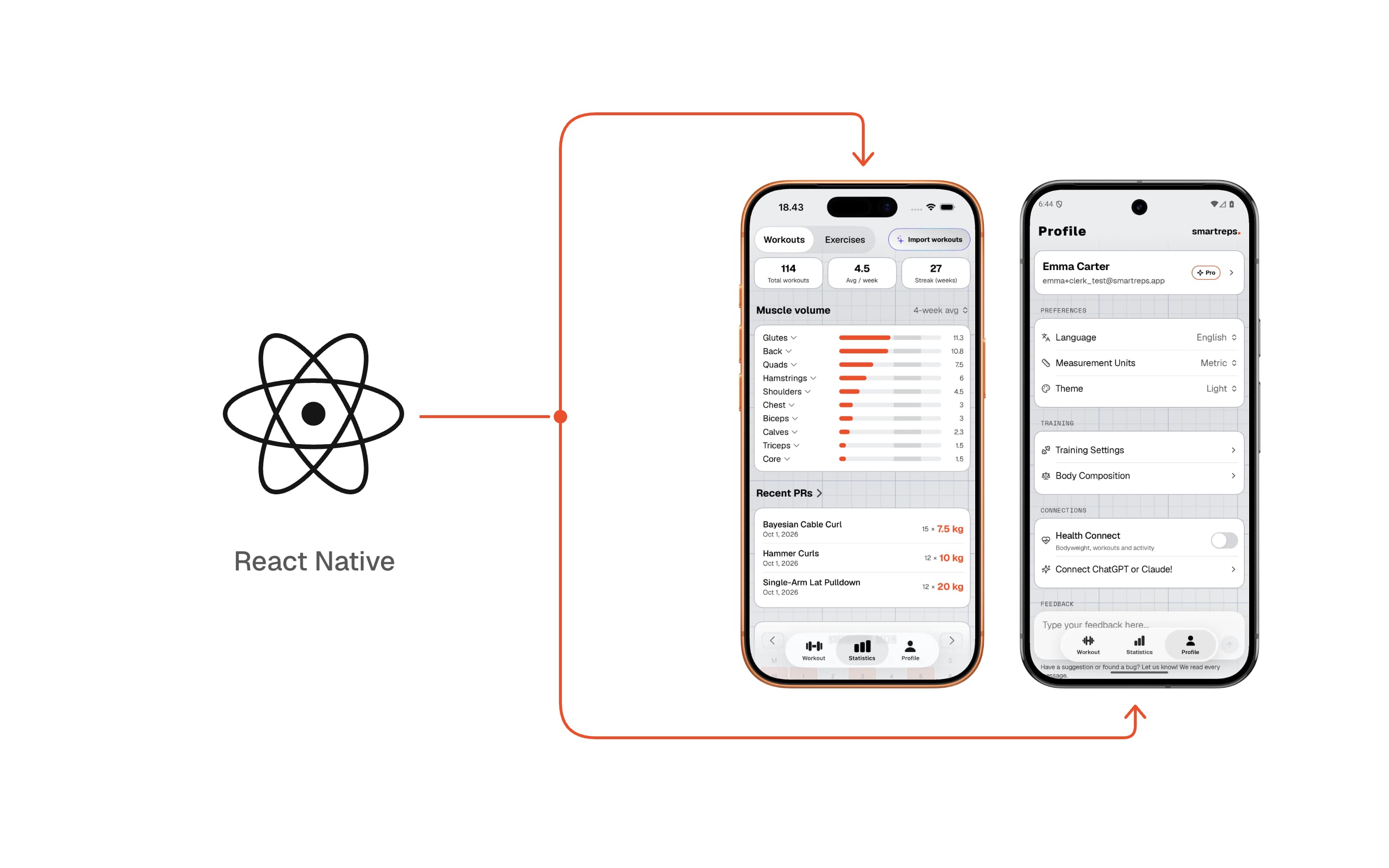
After 13 months of working with React Native, I'd had enough.
The app felt sluggish on Android, startup was slow, and some carousel animations were janky. I kept chasing Sentry errors from dependencies, and I still couldn't get the native feel I was after.
I launched SmartReps in January 2026 and have been developing it ever since. It's an app for planning and logging gym workouts, with AI features. I decided to migrate it to native SwiftUI on iOS and Kotlin with Jetpack Compose on Android. Claude Code and Codex did most of the coding, and the main implementation work happened in a few concentrated days.
SmartReps is a medium-sized app with workout logging, templates, statistics, subscriptions, AI features, and integrations with the mobile platforms. There was quite a bit more to migrate than a couple of screens.
Maintaining two native apps would previously have felt like too much work for a team as small as ours. Coding agents are clearly changing that calculation. But I spent a lot of effort getting the architecture and specs right before letting them work through the implementation. The preparation is a big part of why this was possible.
Architecture for coding agents
One of my main goals was to give agents a way to run the app and verify changes themselves. Otherwise I'd still have to check every feature manually on both platforms.
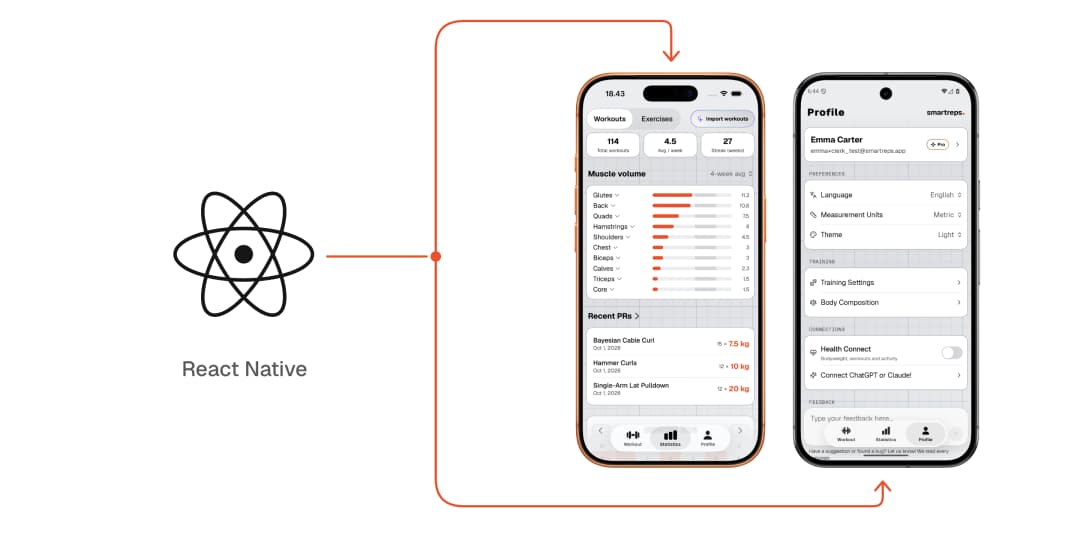
Both apps have a headless application core. It owns the feature stores, navigation, and workflows, while pure rules live in domain libraries. SwiftUI and Compose render the state and send typed intents back to the core. Views don't access the backend directly.
The development builds also have a command-line interface. An agent can start a workout, navigate to a screen, inspect the current state, and wait for a particular condition:
smartreps send session.startFlexibleWorkout name="Push day" --remote 7411smartreps wait workoutTab=activeSession --remote 7411 --timeout 15000smartreps snapshot --remote 7411
These commands use the same intent handling as the UI. A test that starts a workout through the CLI exercises the actual application workflow, and the snapshot reads the state the views use.
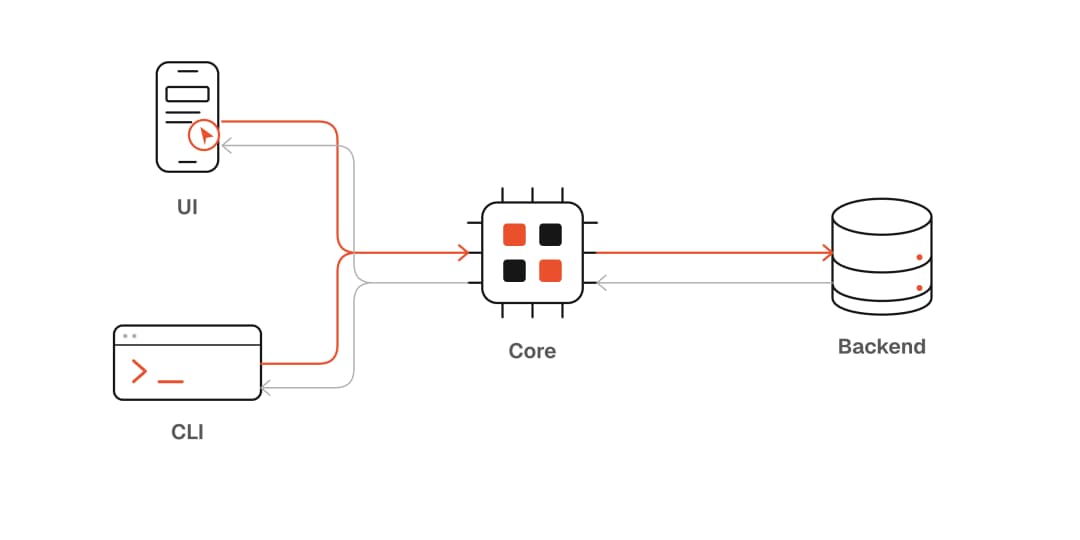
On iOS, I can run the core on my Mac against the development backend without launching a simulator. Android's Convex SDK needs an Android environment, so its integration tests run in the development app on an emulator. Both cores can run tests with a fake backend.
This is what I mean by an agentic app architecture: the agent's ability to operate and inspect the app is part of the design. It affects how state, navigation, and user actions are implemented.
Getting the UI right
Even with the architecture and behavioral specs in place, the first runs didn't produce UI anywhere near the reference app. The core was taking shape, but the presentation layer was still largely missing.
There was plenty of work left in reproducing the content, controls, layouts, and interactions. Asking an agent to “make it look good” doesn't give it much to work with.
The control interface helped here too. An agent could reach a specific screen in a known state, take a screenshot, and compare it with the reference. It could then fix the differences and capture the result again.
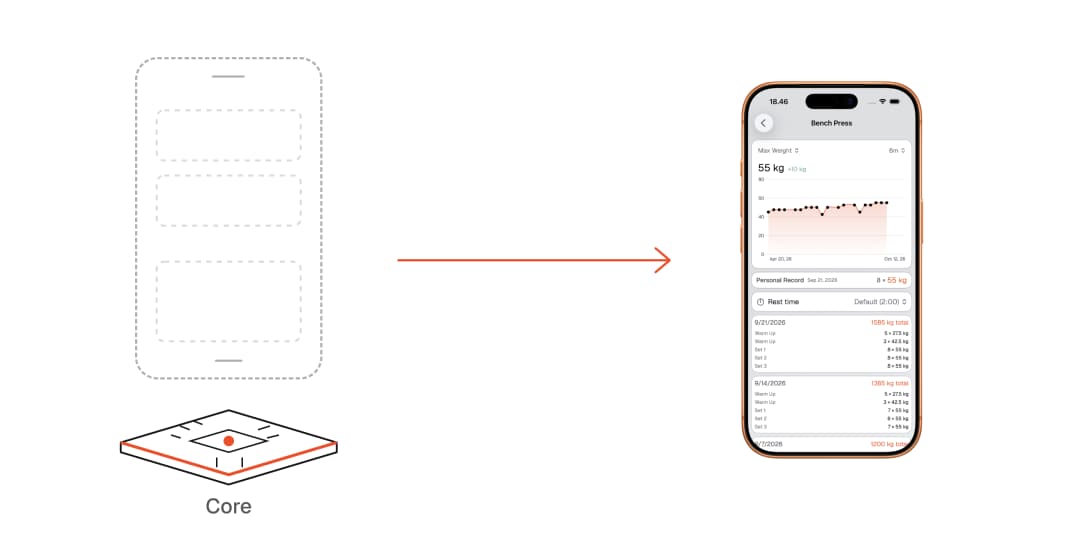
I think this is an easy part to underestimate with agent-assisted development. Agents also need a way to see and check the resulting UI. A test can verify the navigation state, but it won't tell you that a button label wraps badly or that the layout feels awkward with larger text.
Giving agents useful tests
The verification layer has several parts:
- Fast checks: architecture rules, compilation, lint, generated-code checks, and domain and store tests.
- Behavioral scenarios: shared workflows run against the real development backend through the control protocol.
- UI checks: actual taps and gestures, accessibility checks, and inspected screenshots from both platforms.
Each has a purpose. A snapshot can tell us that the workout is active. A screenshot shows the layout. A UI test can drag an exercise row and check that reordering works.
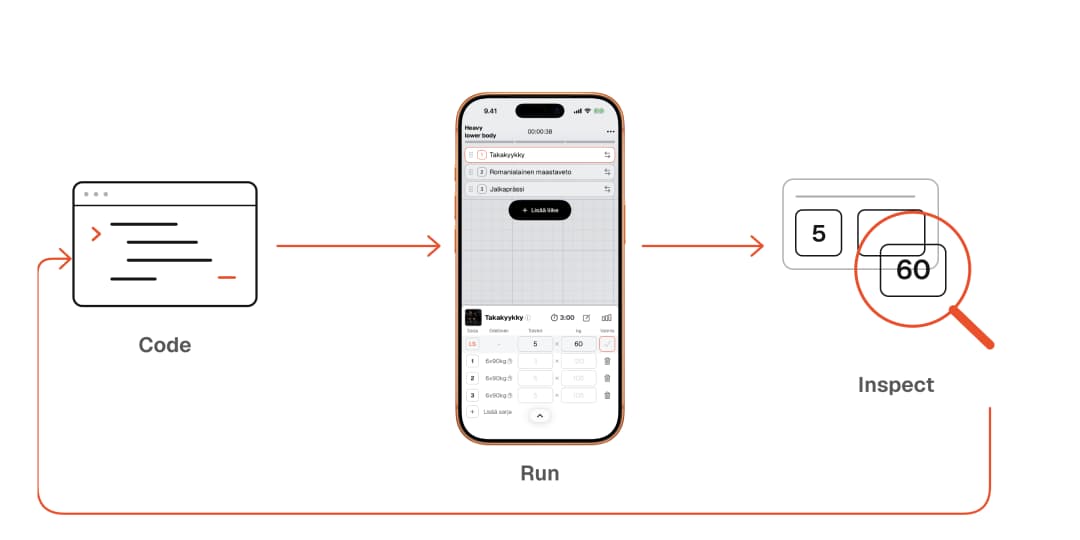
The failures also need to explain what's wrong. When the expected state doesn't appear before a scenario times out, the error reports what was expected and what the app actually returned. This gives the agent a useful starting point for fixing the issue.
Fast checks run on each change. Nightly end-to-end tests run the shared scenarios, native UI tests, and Maestro flows on both apps against the development backend.
The AI features have separate evals. Workout-generation evals assess exercise selection, training load, and progression against the user's history and goals. Import and quick-log evals compare the interpreted exercises and sets with expected results.
Keeping iOS and Android consistent
The two apps share behavioral specs written in Allium, generated backend types, the control protocol, fixtures, scenarios, translations, and artwork. The module structure mirrors between Swift and Kotlin, so agents can easily find the corresponding implementation and tests.
One scenario file runs on both apps. Snapshot contract tests check that their inspectable state has the same paths and JSON types, while workflow tests verify the behavior. Platform differences are recorded explicitly.
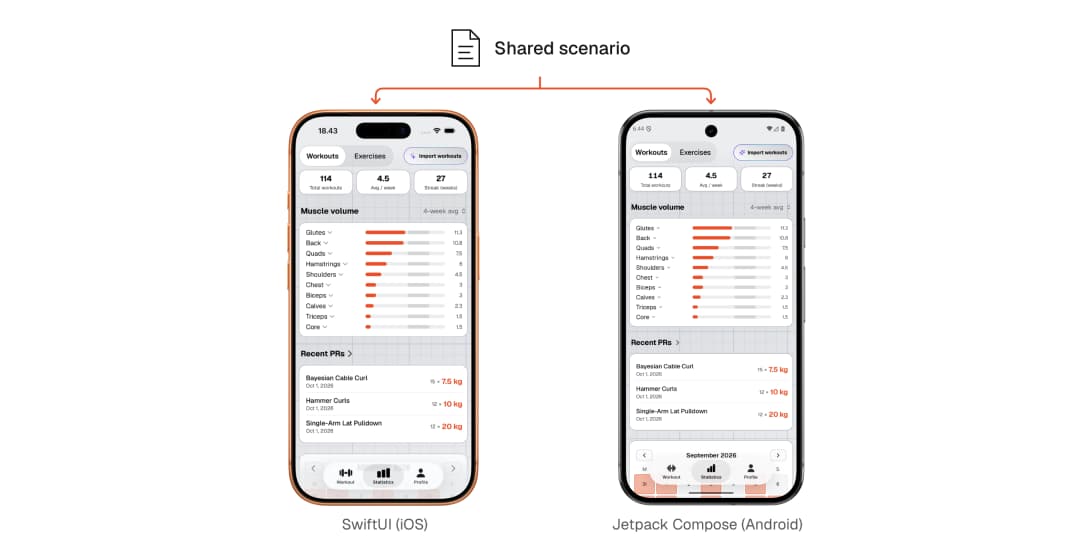
Every app change is implemented on both platforms together. HealthKit and Health Connect still have their respective native implementations, and the agent control server is included only in development builds.
There is some extra implementation work because changes need both a Swift and a Kotlin implementation. With shared specs and agents, that adds very little manual work. React Native wasn't identical on iOS and Android either, so I already had to check both. The QA workload is about the same.
So what's the frickin point?
SmartReps already has more than 1,700 users and is growing. The point was to give them the best possible user experience and accessibility, without compromising the product to accommodate the framework. The native apps still need fine-tuning, but there are already some concrete differences.
Startup time
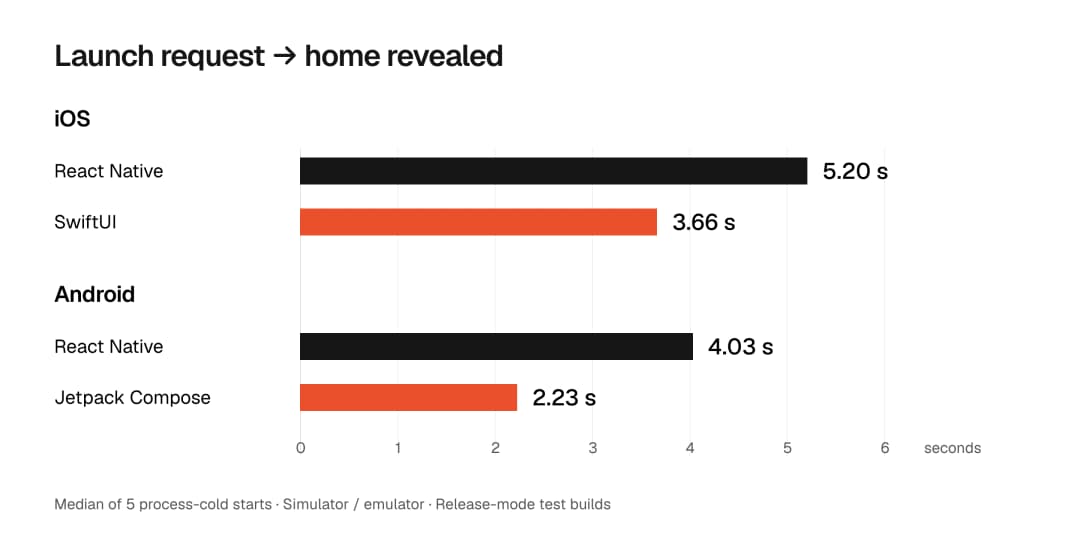
I timed five process-cold starts per app on the iOS simulator and Android emulator, using the same signed-in demo account. The native apps revealed the home screen sooner on both platforms:
Download size and memory
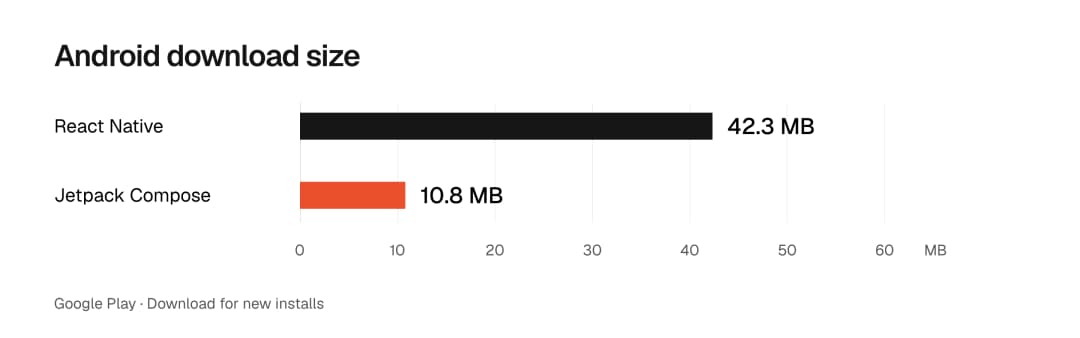
Google Play reports a download of 42.3 MB for the React Native app and 10.8 MB for native Android. About 74% smaller.
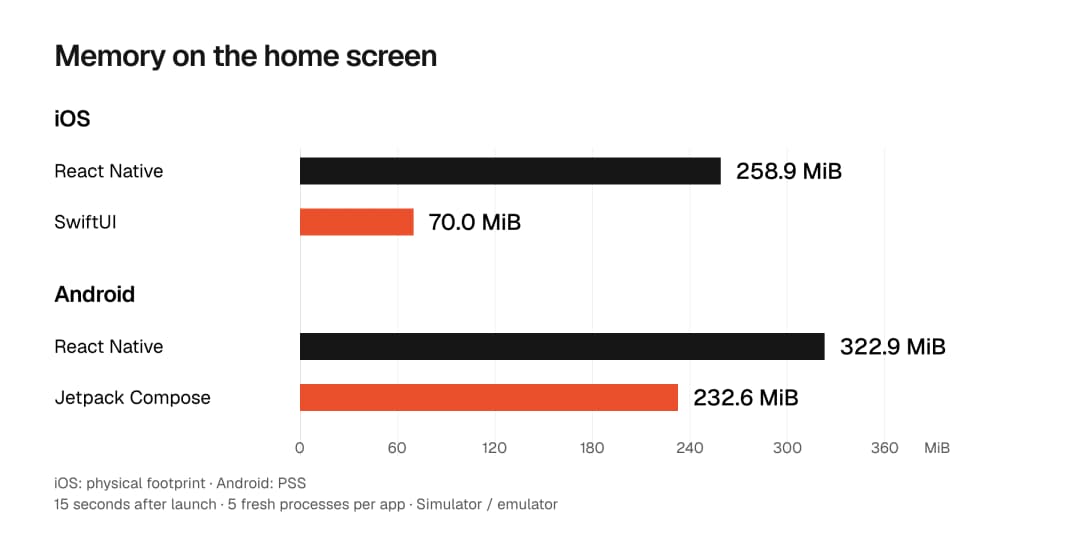
Memory use at the signed-in home also dropped in the simulator tests. iOS went from 258.9 to 70.0 MiB of physical footprint. Android went from 322.9 to 232.6 MiB of PSS. Those are separate platform measures, each compared against its React Native build.
Platform integrations
The React Native dependencies I used for Live Activities were buggy. Going native made it easy to build the behavior I wanted: the activity stays up for the whole workout, shows the current exercise, and counts rest time upward. Android gets the same workout information through an ongoing notification, with Live Update promotion where supported.
I also found Health Connect easier to integrate on Android. Body-weight sync and workout export now use the native APIs directly, with explicit handling for availability and permissions.
Stability
The early Sentry figures are encouraging too:
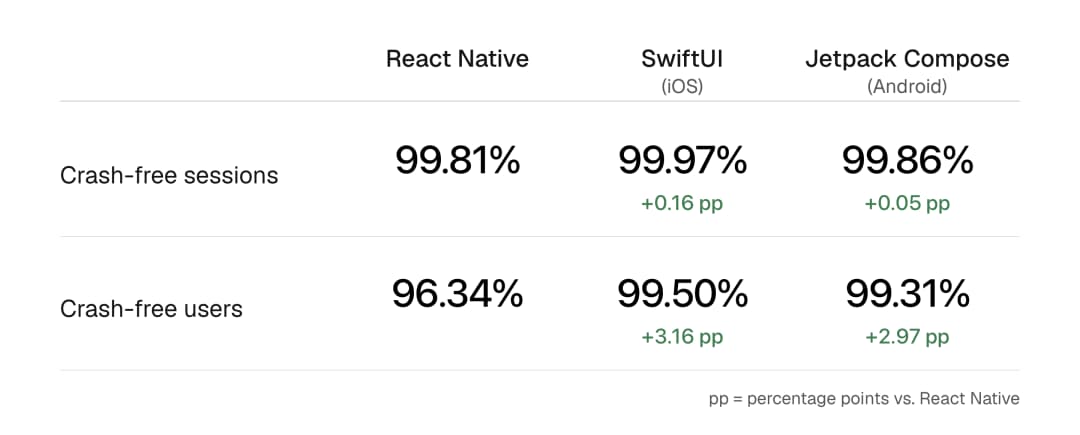
The difference is more visible in crash-free users than sessions. One person can have plenty of successful sessions and still run into a crash. These are early dashboard snapshots; I'll keep watching as more people use the native releases.
The first couple of weeks also look encouraging in RevenueCat: more people are trying Pro.
What made the migration possible
I already had a working app, backend, design, and copy to use as references. The main iOS implementation came together in roughly four days, and Android in about two. An earlier proof of concept preceded those runs, and release preparation and fixes continued afterward.
The few days describe the main implementation push. Architecture, specs, UI iteration, platform integrations, and store preparation still required work. The backend also had to remain compatible with React Native builds already installed on users' phones.
I think the most useful investment was giving the agents ways to verify their output. They could implement a feature, run the relevant checks, inspect it in the app, and continue fixing it. I could focus more on the architecture, product decisions, and quality of the UI.
If you're building an app with coding agents, I'd recommend putting effort into this early. Make the app easy to control, expose the state, and give the agent specific ways to check the result. For SmartReps, that made maintaining two native apps a much more practical option.
If you'd like to see how it feels in practice, give SmartReps a try. It's free to get started, on both iOS and Android.
Want to learn more? Get in touch!